Settings
The Settings tab has the options for the selected environment. Changes take effect when you click Save at the bottom.
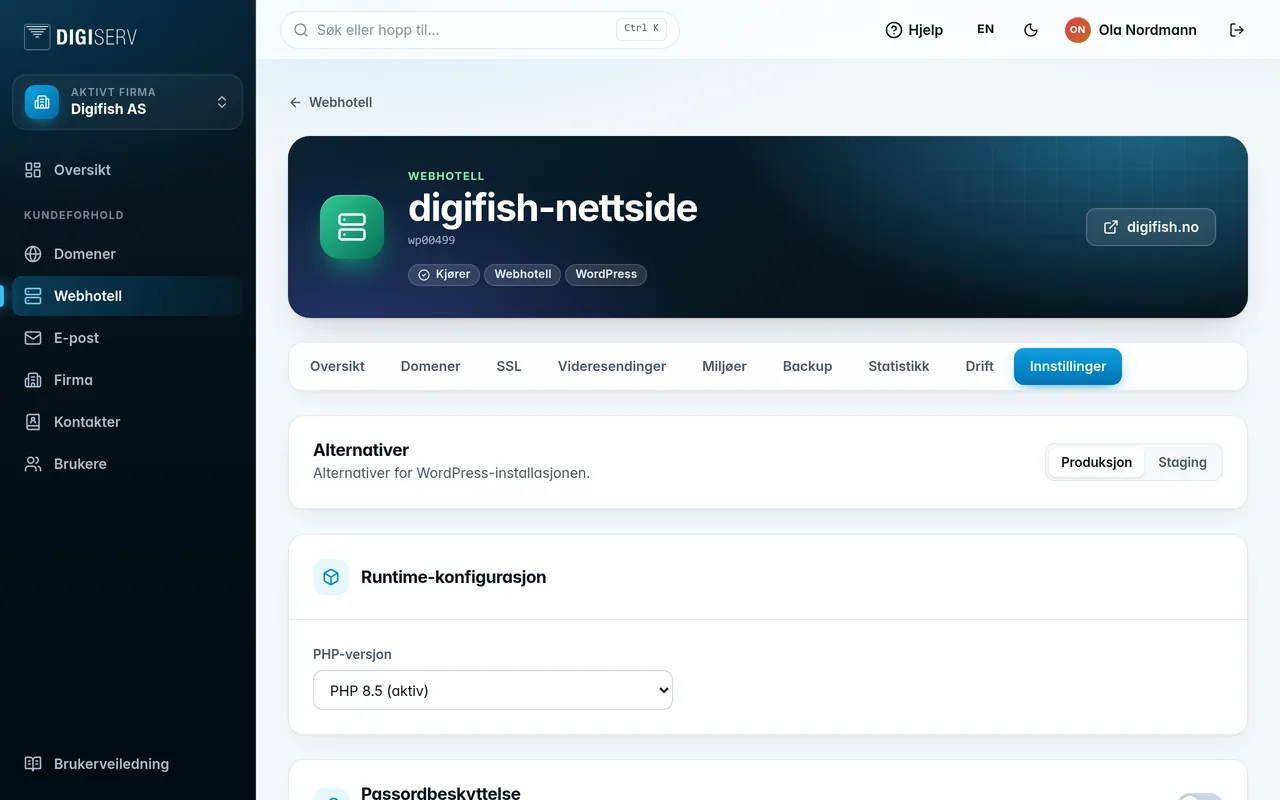
Standard web hosting
- PHP version: choose the version the website should run on.
- Password protection: locks the environment behind a username and password. The username is the web hosting account's username. Handy for staging.
- Toggles under Settings, depending on the type: XML-RPC for WordPress, and on accounts with a cache also Cache, Bedrock, Auto deployment and Git file copying. Each toggle has an explanation.
Container hosting
- Runtime configuration: PHP or Node.js version, Size, Health check path and Internal port. The app must respond on the health check path, otherwise a new version is not put into use.
- Build: choose Auto, Dockerfile or Nixpacks. If the Dockerfile is somewhere other than the root of the repository, fill in Dockerfile path, or click Find Dockerfiles.
- Environment variables (runtime): the values the app gets when it runs. Use them for secrets and settings.
- Build variables (build-time): values used while the app is being built. Do not use them for secrets.
- Persistent volumes: folders that are kept between deployments, at most 5. Under Contents on the server, you can see how much is stored in each volume, and click Show contents to see file names and sizes.
- Password protection: as for standard web hosting.
Changed environment variables do not take effect right away. The page lets you know, and you click Activate changes when you are ready. The container is then rebuilt and restarted. The next deployment also includes them.
Change size
Choose a new size and click Save. You see what the change costs before you confirm with Change size. The container is restarted. Only production can be resized, as staging has a fixed size. If it says you need to contact us, we will help you with the change.
Networks
On container hosting, the owner can connect containers in a private network, so they can reach each other by fixed names, for example a frontend that calls a backend. The Networks card has Create a new network and Connect to a network. Production and staging are kept separate.