Choose what the domain is used for
At the bottom of Overview is the card What should the domain be used for?. The current choice is marked Current. The options include the domain name, for example Park digifish.no.
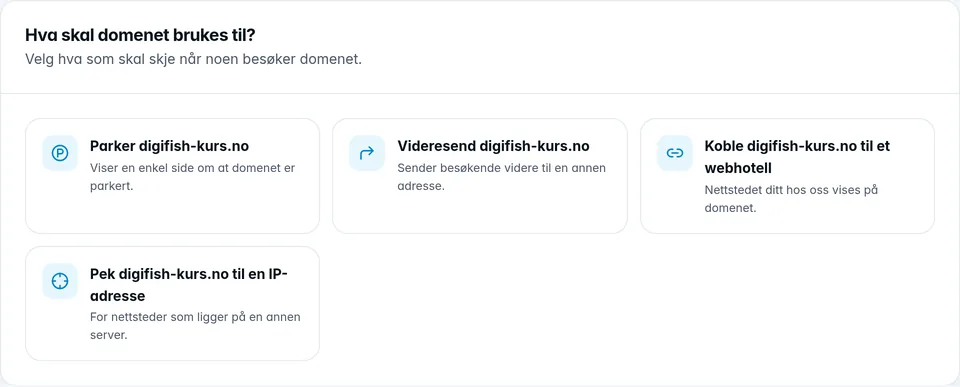
| Option | What happens |
|---|---|
| Park | The domain shows a simple page saying that it is parked. The website stops showing, and the A and AAAA records are replaced. |
| Redirect | Visitors are sent on to the address you enter in Send to address. Choose Permanent (301) or Temporary (302). |
| Connect to a web hosting account | Your website with us is shown on the domain. Choose the web hosting account in the list. Tick the box to connect the www name as well. |
| Disconnect from the web hosting account | The domain stops showing the website. Only shown when the domain is connected to a web hosting account. |
| Point to an IP address | For websites on another server. Enter the IPv4 address, and the IPv6 address if the server has one. The A and AAAA records are replaced. |
Click Save and confirm. The change takes effect within a few minutes. Park and Point to an IP address are only available when DNS is with us. When redirecting or connecting to a web hosting account, you can then also leave Update DNS automatically on. If you connect the www name as well, it follows along when it points to the same place as the domain. If you do not connect it, it is left untouched.
If the domain is the Primary domain for a web hosting account, it cannot be disconnected or changed here. Click Deactivate the domain first. The website then stops responding on the domain until you choose a new primary domain. See also Web hosting.