Setting up email apps
The Settings tab has what users need to set up their email. Step-by-step instructions for each app and device are in Email on your PC and phone, which you can send straight to your users. This page covers what you see in the control panel.
The Email program setup card shows servers and ports for incoming (IMAP) and outgoing (SMTP) email, and the webmail address. The values are the same for all domains, and the username is always the full email address. The list is under Settings for your email app.
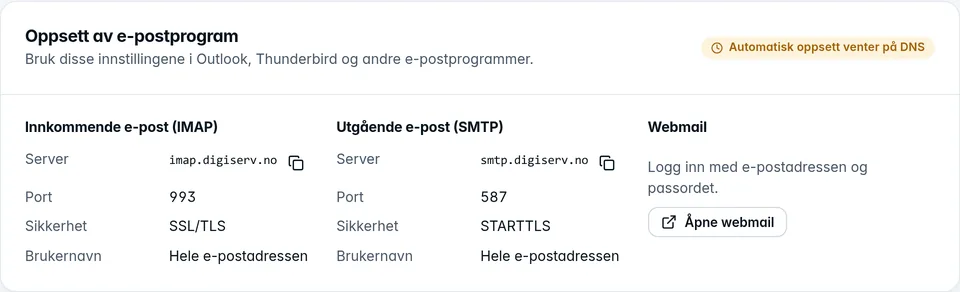
The badge at the top of the card shows whether automatic setup works:
- Automatic setup is active: Thunderbird and classic Outlook find the settings on their own, and the user only needs their email address and password.
- Automatic setup is waiting for DNS: The DNS records for the domain aren't in place yet, and users have to enter the servers by hand in the meantime. See DNS for email.
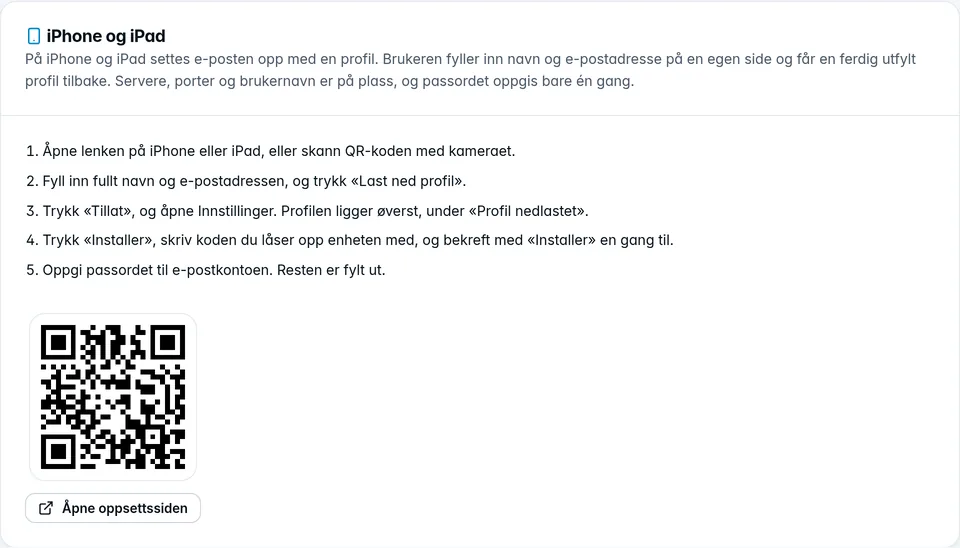
iPhone and iPad
iPhone and iPad can't find the settings on their own. Instead, our setup page creates a ready-made profile. The iPhone and iPad card has a QR code and the Open the setup page button. Share the link or the QR code with the user, and they do the rest on the device. The steps are under iPhone and iPad.