DNS for email
The DNS card on the Settings tab shows the DNS records your email needs.
- If we host DNS for the domain, the records are set up automatically, and you don't need to do anything. Click Show the records if you want to see them.
- If the domain uses external DNS, the records are shown right away. They need to be added at your DNS provider. Use the copy button next to each value, especially for DKIM, which is long and unique to the domain.
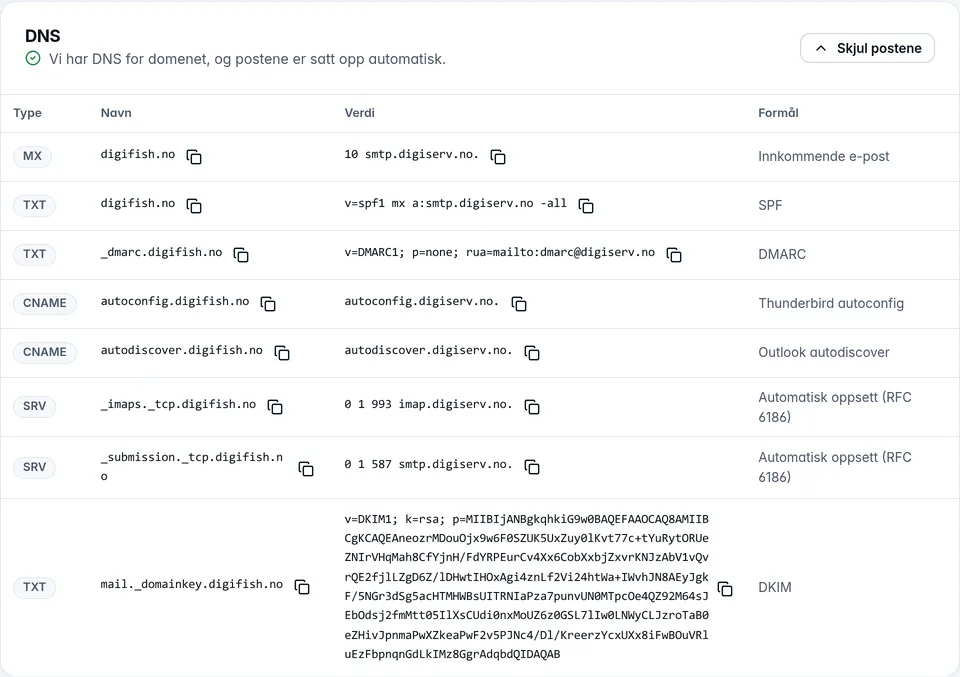
The MX record determines where incoming email ends up. DNS changes usually take effect within a few minutes to a few hours. The records for automatic setup (autoconfig, autodiscover and SRV) aren't needed for email to work, but they make setup easier for users. See also DNS.
Was this page helpful?