Here's how our new meeting room turned out
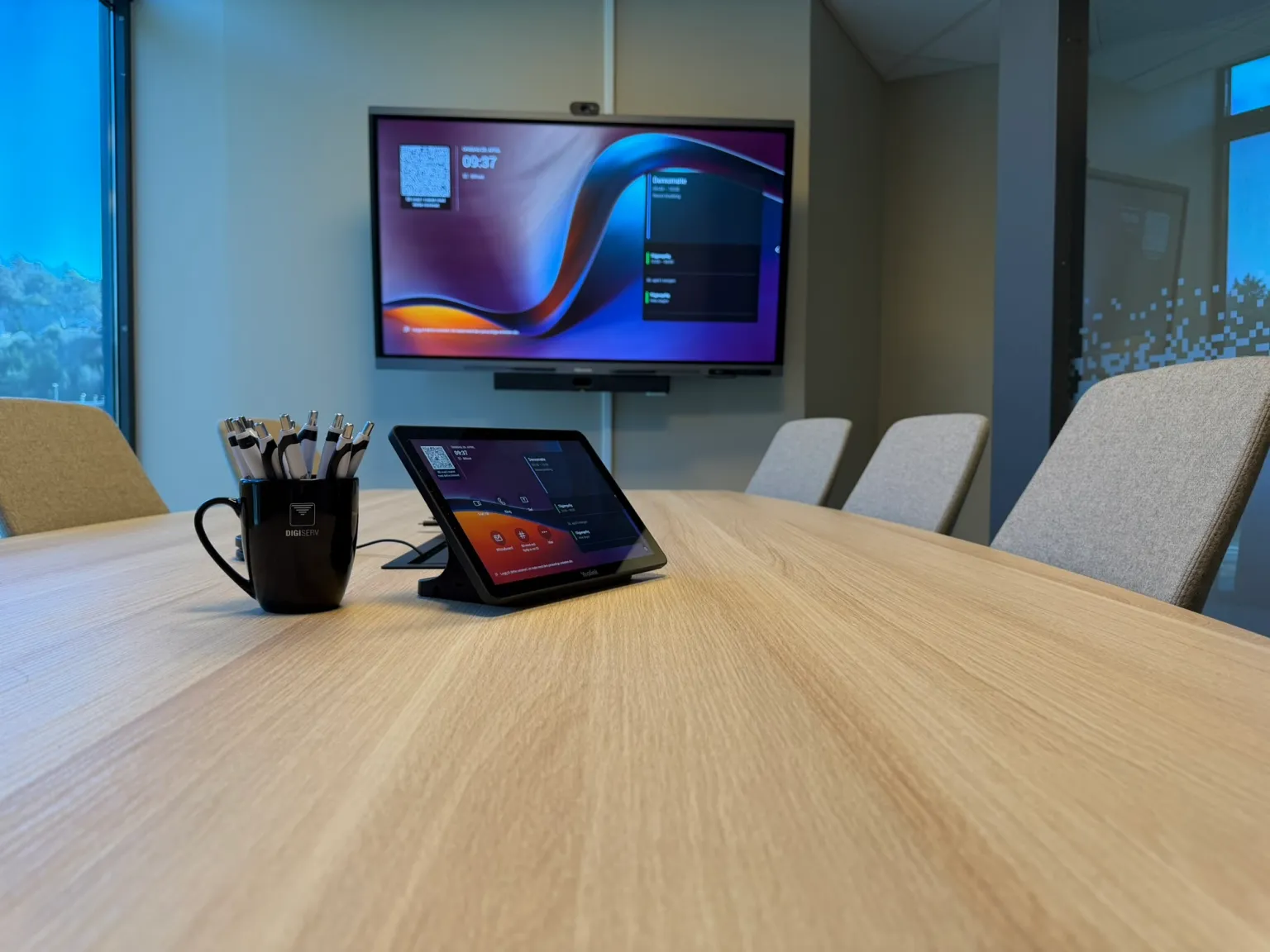
When we moved into our new offices at Havutsikt in March, we promised the meeting room would be more than just a meeting room. Now the equipment is in place, and our doors are open to customers who want to try it.
At the center of the room hangs a Yealink MeetingBar A40 – a slim, all-in-one video bar with camera, microphones and speakers combined in a single unit, mounted below the TV on the wall. Together with a touch console on the table, it runs the whole show.
A deliberate simplification
Traditionally, meeting rooms have consisted of separate cameras, microphones and speakers from different manufacturers, wired together into a setup that often needs IT help to get started. The result is familiar to anyone who's sat in a meeting like that: participants show up ten minutes late, no one can find the right button, and half the meeting is spent troubleshooting the audio.
"We wanted something customers can see and try for themselves, and that actually works right out of the box. A meeting room should be a workspace, not an IT project," says Jarle Steinsland at Digiserv.
That's exactly why we chose the A40. Everything is combined in one unit, and getting started is simply a matter of waking the room and starting the meeting from the console on the table.
Audio is often what fails
In our experience, it's the audio – not the picture – that decides whether a video meeting feels good or frustrating. That's why the A40 has an eight-microphone array with directional MEMS microphones and two 10-watt stereo speakers.
In practice, this means people can sit anywhere around the table and be heard clearly. The microphones are aimed at voices and dampen background noise like typing and rustling paper, and the frequency response covers the entire audible spectrum.
A camera that follows the conversation
On the video side, the A40 uses two cameras with 48-megapixel sensors that deliver 4K video, with a 110° horizontal field of view – enough to cover the whole table even in a small meeting room.
Two features make the biggest difference day to day:
- Auto framing adjusts the shot to how many people are in the room. If you're on your own, the others see your face – not a half-empty meeting room wall.
- Speaker tracking lets the camera zoom in on whoever is speaking, much like our eyes naturally turn toward the person talking.
It may sound trivial, but it's details like these that make a remote meeting start to feel like an in-person one.
The TV is a touchscreen too
The big screen in the room is a Hisense touch TV. It's a small but delightful upgrade: when you connect a laptop to the meeting room, touch gestures from the TV are sent back to your computer. You can scroll, drag and tap directly on the screen, and it controls your computer as if you were using a trackpad or mouse.
In practice, this makes presentations, whiteboard sessions and demos much more hands-on and engaging. You walk up to the screen, point at what you're talking about, and the room follows along.

Wireless sharing – no cable clutter
One of the least glamorous, but most valuable, details in the room is that there isn't a single HDMI cable hanging out of the table. Instead, we use wireless dongles in USB-A and USB-C – you plug one of them into your computer, click the button once, and your screen is up on the big display.
It works on Windows, Mac, Chromebook – and Linux, which is surprisingly rare among solutions like this. For those of us who switch between platforms, it's the difference between getting straight to work and spending ten minutes on drivers.
Phones can also share wirelessly straight to the screen. It sounds minor, but surprisingly often someone has the invoice, contract or photo they want to show on their phone.

Ready for Teams – and whatever you already use
The room is set up as a Microsoft Teams Room, but works just as well with Zoom and other conferencing platforms. For customers already on Microsoft 365 – and that's most of them – the meeting room becomes an extension of the setup you already know.
The Yealink bar supports Wi-Fi 6 and wired Ethernet, so it fits in no matter how your network is set up.
Available or busy – visible from the hallway
Outside the meeting room door, we've mounted a Stoltzen Metis touchscreen, which shows the room's status and today's calendar. If it's green, the room is available. If it's red, it's busy – and you can see which meeting is in progress and when it ends.
Need the room on short notice? You can book it right from the screen. A bit like a conferencing app on the wall – just without having to dig out your laptop first.


A showroom that's meant to be used
The best thing about a showroom is that it gets used. We're happy to welcome customers for a demo, whether you're considering a new meeting room solution or are just curious about what's out there.
You notice the difference best in use. Stop by for a coffee – try sharing your screen, hold a short video meeting from our office to yours, and let the touch TV and speaker tracking show what they can do. Often it's the small details that surprise you the most.
Visiting address:
Digiserv
Gismerøyveien 89, 2nd floor
4515 Mandal
You're welcome to stop by – with or without an appointment.